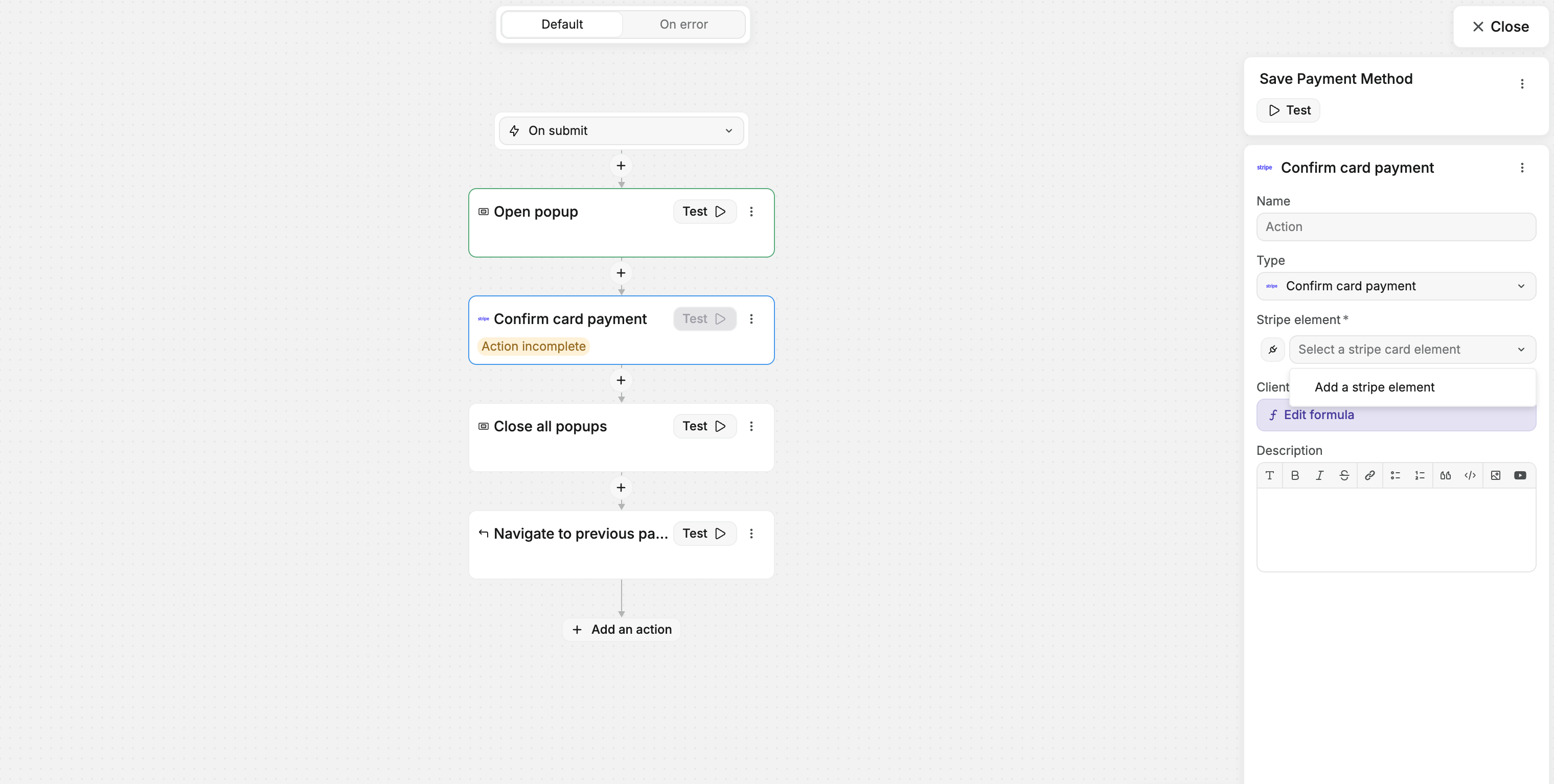
I’m building a UI where I just want a customer to add a payment method; not part of any checkout workflow.
When I create a “Confirm card payment” action my Stripe asset does show up as a “Stripe element”.
Why is that?
Hi Przemek 
Let’s try to troubleshoot this:
1- Did you add the Stripe element inside an empty form container?
2- Are you creating a client secret?
We have some documentation on implementing the Stripe plugin: Stripe | Documentation
If none of that works I’m going to ask you to trigger our support chat to see if it’s a bug.:
Hi Agustin,
As shown in my screenshot, both the Stripe - Payment form and the submit button are within a form container. The workflow is attached to the form container.
I believe I’m setting the client secret correctly. My backend service returns the setup intent, which contains the client secret that I set on the Stripe - Payment form. The Stripe form loads, indicating that the secret is set correctly since it’s not present if it’s incorrect.
I reviewed the docs you mentioned. The only difference in my flow is that I retrieve the client secret from a setup intent instead of a payment intent, as my scenario is different.
I believe I’ve done everything correctly.
Hi @przemek
Let me know if you were able to implement Stripe.
I have the same issue, the stripe element doesn’t show up in the action select menu. I read the doc and watched the Quentin’s tuto on youtube. I guess it just doesn’t work anymore
Hi Daniel -
I am having an issue also - here is a loom - Troubleshooting Stripe Payment Issues 💳 | Loom
Looks like that issue is resolved but I’m back to my original issue that I have an invalid stripe element. See new loom - Troubleshooting Stripe Payment Submission Issues 💳 | Loom
And sorry for the headfake on the earlier issue…
Hi guys, thanks for the information. This is a known issue and our team is working to fix it, although we don’t have an ETA. For now, you can use Stripe payment links or checkout as workarounds. Please keep in mind that the Stripe plugin is just for basic transactions. For more advanced use cases, it might be best to use Stripe’s native solutions coupled with a backend.
Hi Daniel,
Sure, but since we have a Stripe plugin, it is expected that it works correctly as promised and shown in the documentation. If the Stripe plugin doesn’t work and is of no use, then remove it altogether.
I still believe it is useful (shall I say “would be”) to grasp the basics before working on the backend.
Thanks for clarifying
Hi @felix, I understand, as mentioned above, our team is working to fix it. The plugin does have a use case for basic transactions, but for more advanced use cases, it might be more efficient to use native solutions. Stripe has excellent documentation on how to achieve that: Stripe Checkout | Stripe Documentation
Thanks for your comprehension while we work on fixing this.
Hello @DanielL , any news here ? I have the same issue