Data grid input field

Hi all,

I’m currently building a SaaS-like layer on top of an existing service using WeWeb, and I’ve run into a challenge with input fields inside a Data Grid.

The situation:
I have a Data Grid that displays rows from my database. Inside the grid, I place input fields (text / number inputs) so users can edit values directly per row.

The inputs render correctly, but I’m struggling to retrieve and use those input values to update the underlying database record for the correct row.

On top of that, some columns in my database are formula-based (calculated fields). After updating an input value, I’d like the same row to immediately reflect the recalculated values coming from the database.

What I’m trying to achieve:

    1. Inline editing of records inside a Data Grid
    2. Each row updates its corresponding database record
    3. The updated (calculated) values are immediately (after refresh) visible in the same row
    4. A clean, scalable approach suitable for a kindalike SaaS environment

My questions:

  • What is the recommended way to bind input fields inside a Data Grid to row data?

  • How do you correctly reference input values per row when triggering an update?

  • Are there any known patterns, limitations, or “gotchas” when doing inline editing in grids?

If anyone has tips, tricks, or example setups, I’d really appreciate it.
Happy to clarify further or share screenshots if helpful.

Thanks in advance :raising_hands:
— Mitchell

Hi @Mveerman, welcome to the community :waving_hand:

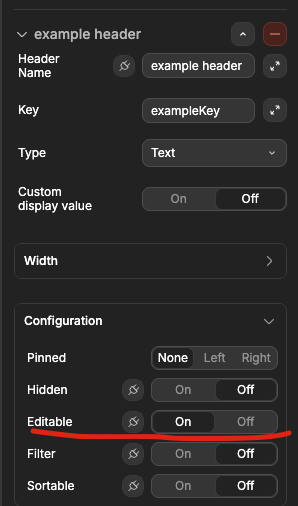
You don’t need to add custom input fields on each column to be able to collect information, you can just create a normal column with data type set to text or number and set it’s settings to “Editable”.

Example here: Datagrid Inline editing no longer available - #3 by Joyce

1 Like

Thanks a lot for the explanation, really appreciated!

This was actually the first approach I tried. I initially used normal Data Grid columns with the type set to text/number and Editable enabled, exactly as you describe.

Where I got stuck (and why I started experimenting with workarounds) is the next step:
how do I make sure the edited value is actually written back to my database?

I can edit the cell inline, but it’s not clear to me:

  • how to trigger the update action

Because I couldn’t figure that part out, I assumed I was missing something and started trying other approaches with custom inputs.

So my core question is:

  • once a Data Grid column is editable, what is the recommended way to persist that change to the database?
    Is there an automatic binding, or should this be handled via an action (on blur / on change / on row update)?

Apologies if this is very basic knowledge that I haven’t picked up yet — still getting familiar with the deeper Data Grid patterns in WeWeb.

Thanks again for taking the time to reply :folded_hands:

I finally figured it out in the workflow module, thanks again!!

2 Likes