Hi there,
I would like kindly ask for a hand in a issue that is stucking me.
On my Select, using “rollup with distinct” and “lookup”, the result is not getting the data from the fiels as expected, in my example “1º Ano”. it only shows the “id”. So, distinct works, but lookup does not list the expected result.
Trying a different approch, using only a Collections or “filterByKey”, the “distinct” not work, but the the lookup works and format is correct, but there is duplicates on the list.
Might just be missing something because I’m still waiting for the coffee to set in this morning… but I see in both your uses of lookup, you don’t use the whole function. Is this intentional? Does using it fully still not get you the result you’re after?
The full function just for reference: “lookup
Return the first object in array in which key is equal to value
Default value for key is ‘id’
lookup(value, array, [key])”
So it looks something like this (ignore the if statement it’s wrapped in, I just screenshot one out of my own code):
So “chair_name” is a field within my .data that I’m referencing the value of a select against and pulling up all instances where the chair_name matches, then getting the .is_upholstered as the result I want to display the select this lookup is in.
Thanks for your reply, I did some tests with the [key] inside the “lookup” for the many formulas I am using on the Options and there is no change on the results.
If I could find a way to avoid duplicates on the lists of objects for the grade_id, it would be fixed quickly.
If you have any other suggestions, please let me know. I will keep trying. But this issue is really weird ; )
Thanks a lot!
So you’re pulling this information from an array of objects by the look of it, and that array contains multiple results that has duplicate grade_ids and grade_names in it. Even if you do find a way to get no duplicated results, how do you know you’re referencing the correct object in the array? What’s the purpose of the array and the select?
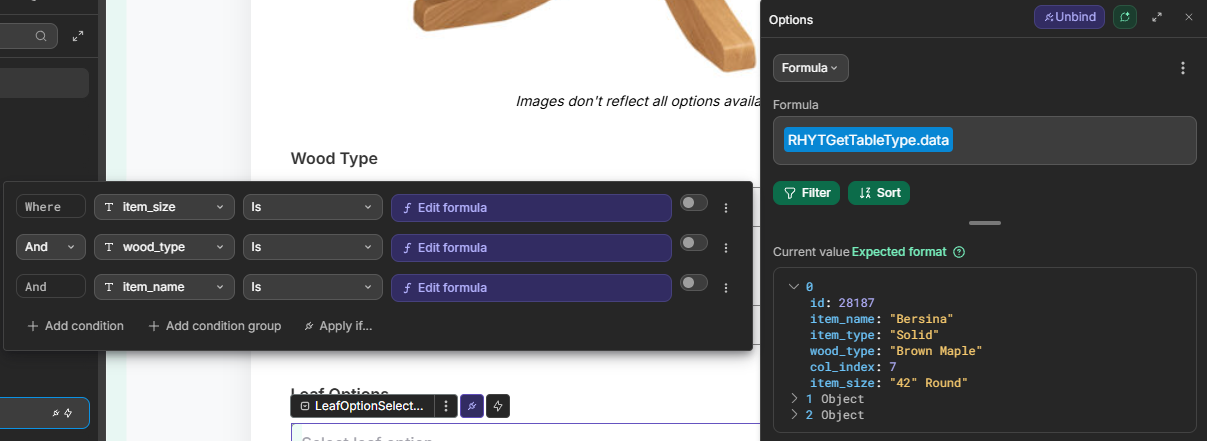
You can do multi-layer lookups/filters. Personally I would set your option to reference the .data array, and then use the Filter option (listed below the Formula field) to filter down until I go the results I wanted. Like here, where i have certain information intentionally duplicated in the database so I can use multiple select fields to gradually narrow down what option I want until I get just three unique objects that are relevant.
Dunno if that’s helpful or not. It’s hard to say for sure without knowing what you’re trying to achieve with the array and why there are duplicate results in there at all.
Hi Dan,
Thanks for the suggestion. I have a table where grade_id is a column with FK to another table “grades”.
The main objective is to assign ids from Classes to Grade on a table with FKs.
I am exploring your suggestion, but until now I couldn’t solve the issues: Or I have the format expected like 1º Ano duplicated or I have the non-duplicated without the format like “1”.
What is weird is that the “Current Value: 1º Ano” and it do not display this on the Select.
I also have created a function and a trigger to bring to a column grade_name on Supabase and even though, the select is not showing the expected format. I will keep trying with your suggestion…If you have any other insight, please let me know.
Thanks a lot.
Hi there,
After spending a lot of time trying to fix this, the most elegant solution (kind of ; )) was to create a Supabase View.
A SQL like this works like a charm and will save a lot of time if you are stuck in a similar situation.
create or replace view school_grades_unique as
select distinct
school_id,
grade_id,
grade_name
from
school_classes;