@dorilama can you please confirm (or deny) a BUG we believe is now present.
When updating to another GitHub version of a custom component - via WeWeb after deployment in Github - WeWeb component does NOT change to the latest version even after selecting in WeWeb.
Example:
my_company_component (v1)
you push an update in GitHub to v2
you select v2 in weWeb …
I just updated my very first test of coded component, a github project from almost 4 years ago, and it was automatically built and I can use it correctly after selecting the current version in the dashboard.
Does your component build correctly after you push a new version on github?
one odd thing is that if I keep pushing new versions sometimes weweb shows the wrong package version, like from a previous one, but the code is on the last one.
Could it be that there is some caching of dependencies (and maybe of package.json) to speed up the building process and you are stuck in an old package.json with an old list of dependencies?
EDIT: I think this is more a data display issue because even when the displayed version is not correct the included dependencies are the one of the last dependency
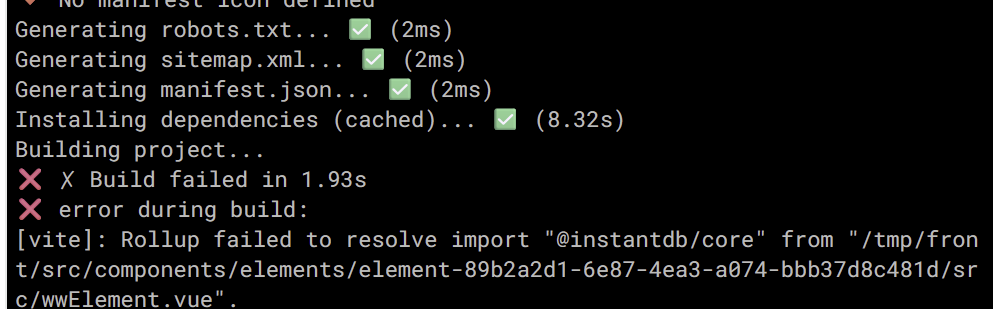
EDIT2: I do see a problem when changing dependencies and building the project: the build uses cached dependencies so if I have a new one in my component it fails the build because the code is referencing code that is not there in the project.
so yeah, weweb gets the updated component (differently from what is happening to you) but the cached dependencies for the build are non invalidated when the dependencies of the components change
Hi I (probably) have the same issue, reported it via chat, last answer was 4 months ago. So I can confirm I’ve been (and probably still am) experiencing something similar with a component which is older. Force fetching Github didn’t work in my case.
I can confirm it’s a known issue and we do have an internal ticket open for it. It hasn’t had many reports, which is why it wasn’t prioritized earlier, but I’ll check in with the team and see if we can move it up. I’ll update you as soon as I have more details.
In the meantime, if you’ve noticed it happens in specific cases but not others, please don’t hesitate to let me know here so I can add the info to the ticket.
The team had another look and was only able to reproduce the visual bug. We’ve added that fix to our roadmap
@dorilama , I see you have a hunch that there might be an issue with cached dependencies. Would you mind creating a bug ticket for this here and sharing a bit more info about how to reproduce the issue with a link to your project?
@Broberto , if you still have the issue, could you share a video that includes a voiceover walking us through the process? I’ll add it to the ticket to help the team better understand what’s going on.
I’m not sure if this is the same as what I am experiencing but I am trying to create a coded component based on a Syncfusion component. I have a base version working but even if I make a one word cosmetic change to the code base and push to Github, WeWeb build fails when detecting the change. If I then click the Force Fetch Github menu option the build succeeds?