# Close Select Element when in Collection
**URL:** https://community.weweb.io/t/close-select-element-when-in-collection/6000
**Category:** How do I?
**Tags:** select
**Created:** [December 18, 2023, 8:52pm UTC](https://community.weweb.io/t/close-select-element-when-in-collection/6000 "2023-12-18T20:52:57Z")
**Posts on this page:** 5
**Page:** 1
### Author:  [@nick](https://community.weweb.io/u/nick)
#### Post date: [December 18, 2023, 8:52pm UTC](https://community.weweb.io/t/close-select-element-when-in-collection/6000/1 "2023-12-18T20:52:58Z")
**Question:**
How do I close a select element located within a collection when an option has been chosen?
**Setup:**
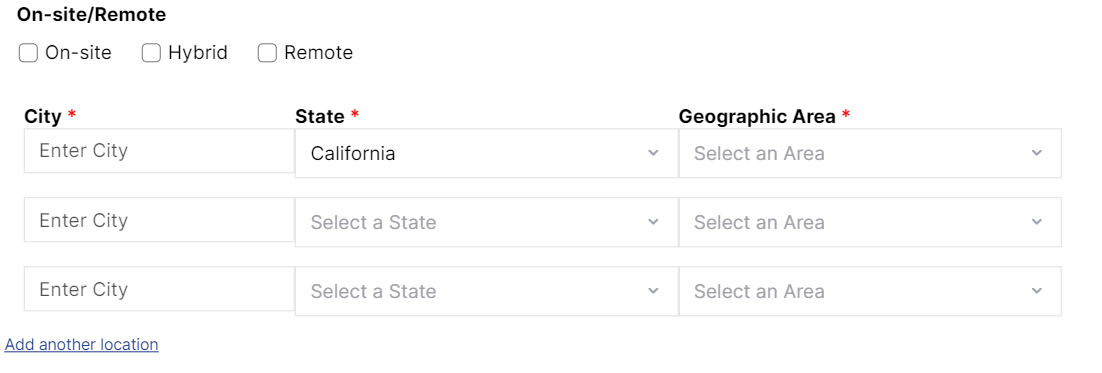
I have 2 select elements being presented for each item in a collection, created from an Array. A “State” select and a “Geographic Area” select. The State select drives the options available within the Geographic Area select. When a new State is chosen, I reset the Initial Value of the Geographic Area select element. I accomplished this by creating a “geoAreaInputValue” variable for each item in the collection, binding it to the initial value of the Geographic Area select element, and resetting the value to “” (empty) when a new state is chosen.
I had to use the “geoAreaInputValue” to perform the reset because there is no unique “Select Input Variable” available to reset the component when it is contained in a collection.
## 
**Problem:**
Because the Initial State of the Geographic Area select is bound to the “geoAreaInputValue” variable, when a Geographic Area option is selected, the dropdown containing the Geographic Area options does not close. The Select Item component isn’t granular enough that I have control of the conditional rendering of the dropdown + options.
Is there any way to close the dropdown when a new item has been selected?
Or, is there any way of resetting a Select Input Element when it is in a collection and not having to use the Initial Value of the element?

https://www.loom.com/embed/4d8cb3c9230f4cfeae1dce64734484d7?sid=bf4a5c7f-741c-41f4-845b-e7b0fe67d7d7
---
### Author:  [@Joyce](https://community.weweb.io/u/Joyce)
#### Post date: [December 22, 2023, 10:09am UTC](https://community.weweb.io/t/close-select-element-when-in-collection/6000/2 "2023-12-22T10:09:41Z")
Mmm… I’m not sure. Let me ask the tech team about this.
In the meantime, perhaps you could try the multi-select element with two advanced options enabled:

Maybe the “Close on select” option will force the close in this case.
---
### Author:  [@Kevin](https://community.weweb.io/u/Kevin)
#### Post date: [December 22, 2023, 10:23am UTC](https://community.weweb.io/t/close-select-element-when-in-collection/6000/3 "2023-12-22T10:23:10Z")
Hi @nick ! 👋
Normally, the element should close automatically if the **‘close on select’** option is activated. However, it’s possible that, depending on your element’s configuration and options, this default behavior might be overridden.
If **‘close on select’** doesn’t work, there’s a technique you can use to force the element to remount. You can find the instructions on this page: [How to Reset a Dropdown Element](https://community.weweb.io/t/how-to-reset-a-dropdown-element/5436/3).
In your case, the idea is to trigger this workflow immediately after changing the value of your select.
---
### Author:  [@nick](https://community.weweb.io/u/nick)
#### Post date: [January 2, 2024, 10:59pm UTC](https://community.weweb.io/t/close-select-element-when-in-collection/6000/4 "2024-01-02T22:59:39Z")
Thanks @Kevin and @Joyce. The “close on select” is activated for the select element. I believe it has something to do with that fact that the select element is within in a collection. And that I have to reset the Geographic Area when the State changes using the “Initial Value” of the Geographic Area. I just null it out.
Because the select element is componentized and obscured, I am not able to “tell” the Geographic Area dropdown to close when a list item has been selected. Or else I would just create a workflow off the the list items.
---
### Author:  [@nick](https://community.weweb.io/u/nick)
#### Post date: [January 2, 2024, 11:15pm UTC](https://community.weweb.io/t/close-select-element-when-in-collection/6000/5 "2024-01-02T23:15:24Z")
@Kevin just looked at that work around. Makes sense. I broke my feature, but when I get it up again I’ll try it out.